

Computers are often connected to each other on a network. They send requests to each other in the form of packets that travel from the host to the destination. Linux provides various commands from network configuration and troubleshooting.
Network Configuration and Troubleshooting Commands in Linux
- Using Ping (Packet Internet Groper) Command
- Using nslookup Command
- Using traceroute Command
- Using host Command
- Using netstat Command
- Using Arp Command
- Using ifconfig Command
- Using Dig Command
- Using Route Command
- Using Ethtool Command
- Using Hostname Command
Using Ping (Packet Internet Groper) Command
The ping command is used to ensure that a computer can communicate with a specified device over the network. The pings command sends Internet Control Message Protocol (ICMP) Echo Request messages in the form of packets to the destination computer and waits in order to get the response back. Once the packets are received by the destined computer, it starts sending the packets back. This command keeps executing until it is interrupted.
ping command provides details such as
- the number of packets transmitted.
- the number of packets received.
- time is taken by the packet to return.
ping command is generally used for the following purposes:
- measuring the time taken by the packets to return to determine the speed of the connection.
- to make sure that the network connection between the host and the destined computer can be established.
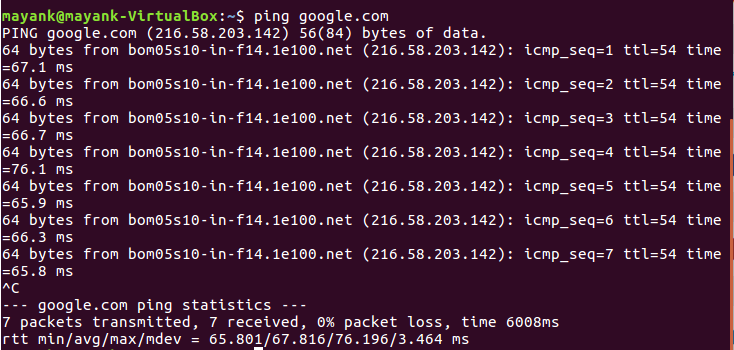

Using nslookup Command
The nslookup command queries the DNS in order to fetch the IP address or the domain name from DNS records.

Using traceroute Command
Thetraceroute command is used to get the route of a packet. In other words, the traceroute command is used to determine the path along which a packet travels. It also returns the number of hops taken by the packet to reach the destination. This command prints to the console a list of hosts through which the packet travels in order to the destination.
